
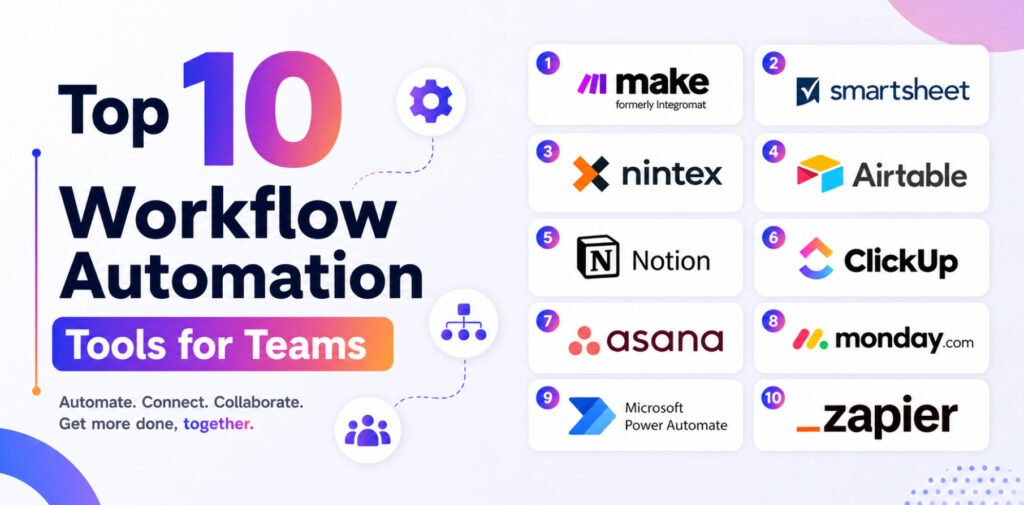

Workflow automation is the process of streamlining multi-step business operations often across multiple applications using specialized software. It works through triggers, rules, and data, allowing tasks to move automatically between systems and teams with minimal manual effort.
By replacing repetitive work with smart automation, teams can save time, reduce errors, and improve overall productivity. However, with so many tools available from simple no-code connectors to advanced enterprise platforms, choosing the right one can feel overwhelming.
Below are the top 10 workflow automation tools for teams:
- Zapier
- Microsoft Power Automate
- Monday.com
- Asana
- ClickUp
- Notion
- Airtable
- Nintex
- Smartsheet
- Make (formerly Integromat)
1. Zapier
Zapier is a popular automation tool that connects thousands of web applications, enabling them to share data without manual input.
It allows users to create automated workflows called Zaps, which consist of a trigger (an event that starts the workflow) and an action (the resulting task). Zapier is especially useful for automating everyday tasks and connecting commonly used apps in a simple, no-code way.

2. Microsoft Power Automate
Microsoft Power Automate is a powerful automation platform that combines digital process automation (DPA), robotic process automation (RPA), and process mining.
With its wide range of pre-built connectors, users can automate everything from simple tasks to complex enterprise workflows. It’s particularly effective for businesses already using Microsoft’s ecosystem.

3. Monday.com
Monday.com is a visually intuitive work management platform that combines project tracking with automation features.
It offers no-code automation, customizable templates, and AI-powered tools to help teams plan, execute, and deliver work efficiently all within a single workspace.
4. Asana
Asana is a widely used project management and collaboration tool designed to help teams organize and track their work.
It centralizes tasks, deadlines, and communication, reducing reliance on email and improving team coordination. Companies like Deloitte, Airbnb, and Dropbox rely on Asana for managing projects at scale.

5. ClickUp
ClickUp is an all-in-one productivity platform that brings tasks, documents, timelines, and communication into one place.
It also includes built-in AI features that assist with writing, summarizing tasks, drafting emails, and suggesting next steps—helping teams work faster and smarter.

6. Notion
Notion is a flexible workspace that combines note-taking, databases, and project management tools.
Its block-based, no-code system allows users to create customized workflows, manage data, and even build internal wikis. With Notion AI, it also doubles as a writing and productivity assistant.
7. Airtable
Airtable blends the simplicity of spreadsheets with the power of databases.
It allows users to build custom applications without coding, making it ideal for managing workflows like content production, hiring pipelines, and project tracking.
8. Nintex
Nintex is a no-code platform designed for process automation and workflow management.
With its easy-to-use interface, businesses can automate tasks such as document approvals, employee onboarding, and invoice processing without needing technical expertise.

9. Smartsheet
Smartsheet is a cloud-based project and work management tool with a spreadsheet-like interface.
Unlike traditional spreadsheets, it offers advanced collaboration, automation, and tracking features making it suitable for managing projects from start to finish.

10. Make (formerly Integromat)
Make is a powerful visual automation platform that connects over 1,000 apps using a drag-and-drop interface.
It allows users to design workflows visually and monitor how data flows between systems in real time, making complex automations easier to build and manage.
Conclusion
Choosing the right workflow automation tool starts with understanding how your team operates on a daily basis.
The best solution should integrate seamlessly into your existing processes, support both simple and complex workflows, and enhance productivity without adding unnecessary complexity.



Pingback: Top 6 Chatbot Tools for Ecommerce Support – TopatTop.com